Using the Search box
If you are looking for something specific – use the search box at the top of the page.

Just type in a word that will appear in the article. E.g. Try typing history into the box and click search.
When a list appears you can get more detail by clicking on the title of the article.
Browsing the Archives
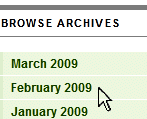
If you want to look at the articles appearing in a particular month’s issue then click on the Archive list of months at the right of the page.
E.g. Click on February as shown alongside and you will get a list of excerpts of the articles in the February edition
The list is in alphabetical order and at the bottom of the list you may find « Earlier in alphabet or Later in alphabet » . Clicking on these will bring up more articles.
Excerpts or Full Article?
To save space many articles are displayed as excerpts ending in […]
If reading the excerpt makes you want to see the full article then click on the excerpt title as shown below.

Browsing Topic Categories

If you want to know about a particular category of topic – such as something may pertain to the council, click on the council category as shown alongside.
The list will be in date order starting with the most recent and working back. At the bottom of the list you may find « Older entries or Newer entries » . Clicking on these will bring up more articles.
Note – there is such a huge mixture of topics that those items that don’t fall into the main categories are all filed under Miscellany. Remember you can also use the search box!
Use your mouse

Basically just move your mouse pointer around the screen. If it changes from the normal pointer to a hand then you have found something to click on that may take you somewhere interesting.
You can always get back to the starting page by clicking the Home button near the top of the page or back here using the Help button as shown below.

Use the forward and back buttons on your browser

Remember – you can also move back through previous pages using the back (or forward) buttons on Internet Explorer, Firefox, or whatever other browser you use to view web-pages.
Need bigger text?

Most web browsers increase the size of the text if you hold down the Control button and, at the same time press the + button. Use Control and – to make it smaller.



 Click for recent planning applications.
 Click for emergency contacts
 Click for Bloxham Weather
 Click for Local Traffic Report
 Click for Air Train Bus Info
Recent Comments